Student information system

A student information system with every record in one place

Each student's details, guardians, classes, attendance, homework and grades live on one record. The office keeps it up to date, and teachers and parents see the part that is theirs.

First 3 months half price · From €19 a month per school · VAT included

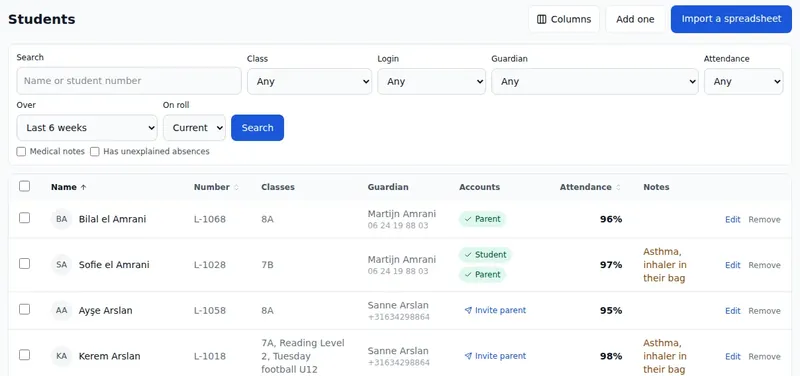
The student list in StudaHub: each student's number, classes, guardian, logins, attendance and notes, with filters above

StudaHub is a school management system and a student information system (SIS) in one. Every student has one record with their details, photo, medical notes, guardians and classes. Attendance, homework, grades and progress are added to that same record as the school day happens, so nobody keeps a second list.

Student records

One record per student, and everything on it.

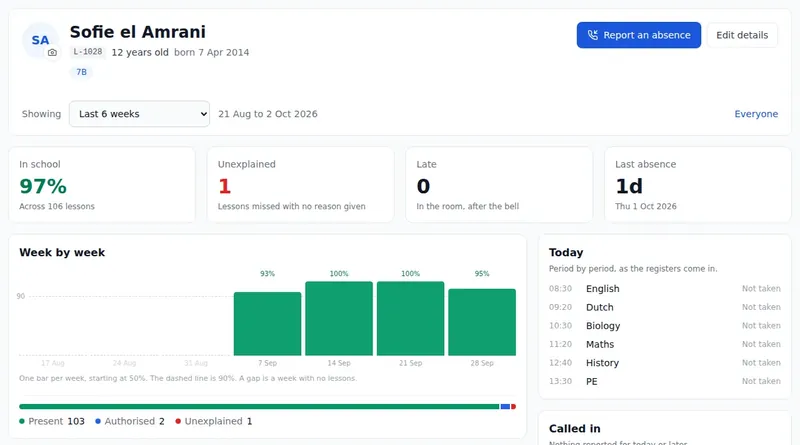
Name and preferred name, date of birth, student number, photo and medical notes, with the classes the student is in. Open a student and you see their attendance week by week, today's lessons and who to ring first.

  • Medical notes shown where staff need them
  • A student can be in several classes and groups
  • Attendance per week, per weekday and per lesson
A student's record in StudaHub: attendance week by week and per lesson, today's lessons, who to ring first and the medical notes

Guardians

Every guardian, and what they may do.

Each guardian is linked to their children with the relationship, whether they are the first contact, whether they may collect the child and whether they get messages. A family with three children is one guardian, not three copies.

  • The first contact is the one to ring
  • Who may collect, per child
  • Invite parents to their own login, many at once
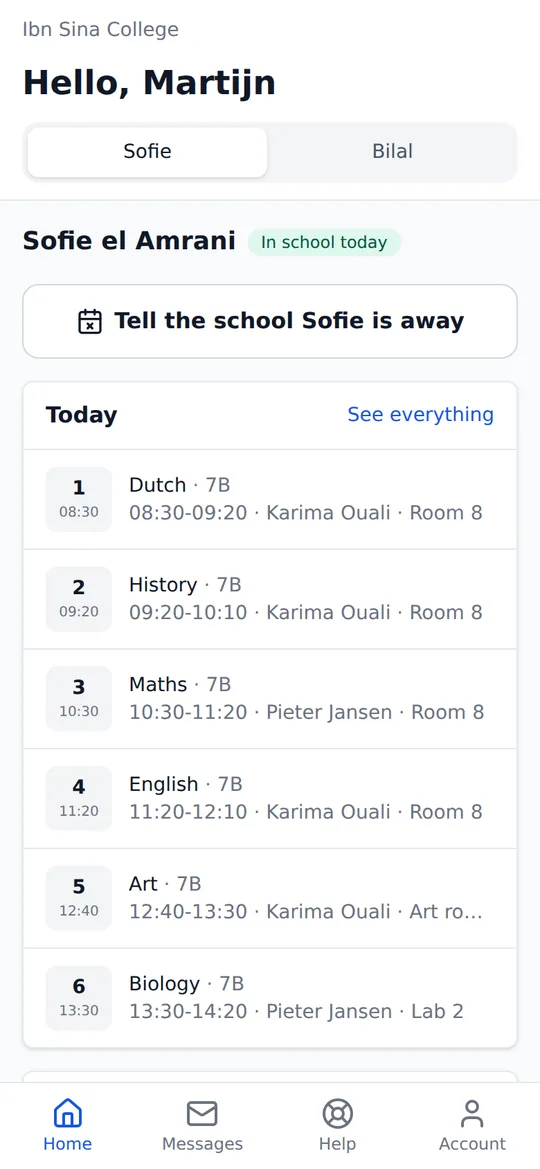
A parent's home screen in StudaHub on a phone: a tab per child, a button to tell the school a child is away, and today's lessons

The office

A list the office can actually work with.

Filter students by class, login, guardian, attendance or medical notes, choose the columns you need and act on many at once: put them in a class, invite their parents or download them as a spreadsheet.

  • Search by name or student number
  • Bulk actions on the students you select
  • Export to CSV, with guardians
The student list in StudaHub: each student's number, classes, guardian, logins, attendance and notes, with filters above

What is the difference between a student information system and a school management system?

A student information system is the record: who your students are, who their guardians are, which classes they are in and what has happened to them. A school management system runs the day around that record: registers, timetables, homework and messages.

Many schools buy the two separately and then keep them in step by hand. In StudaHub they are the same thing. A mark in the register, a piece of homework or a grade is written straight onto the student's record, so there is no second list to update.

What is on a student's record?

The student's name and preferred name, date of birth, student number, photo and medical notes, and the classes and groups they are in. Their guardians, with the relationship, who is the first contact, who may collect them and who gets messages.

Then what happens over time: attendance week by week and per lesson, every absence and late mark, homework and whether it was done, grades and progress through learning tracks. All of it on one page.

Who can see what?

Each of the five roles sees what it needs. The office and the head of school see every student. A teacher sees the students in the classes they teach. A parent sees only their own children, and a student only their own record.

What happens at the end of the school year?

StudaHub moves the school into the new year in one step. It first shows you what would happen, class by class, and nothing changes until you confirm. Last year's records stay as they were, so you can still look back.

Is every change recorded?

Yes. Every change to a student, a guardian or a mark is kept in the school's history, with who made it, when and what it was before. That is what an inspector, a parent or your own data protection officer will ask about.

Student records in a spreadsheet compared with StudaHub

TaskSpreadsheetStudaHub
Where the records liveSeveral files, each a little differentOne record per student
GuardiansA column of phone numbersLinked guardians with who may collect and who gets messages
Medical notesIn a file the teacher does not have openShown in the register and class list
Attendance and gradesKept somewhere elseOn the same record, as they happen
Who sees whatEveryone with the file sees everythingFive roles, each seeing only their part
A changed recordOverwritten, with no traceKept in the history with who and when

How it works

  1. Import your studentsUpload a spreadsheet (CSV) of students and guardians, in English, Dutch, French, German or Turkish column headings.
  2. Check and completeAdd photos and medical notes, and link brothers and sisters to the same guardians.
  3. Put students in classesSelect students and enrol them in a class or group in one go.
  4. Invite parentsParents get their own login and see only their own children.

Frequently asked questions

What is a student information system?

A student information system (SIS) holds the records of a school's students: their details, guardians, classes, attendance and results. StudaHub is one, and it also runs the day around those records: registers, timetable, homework and messages.

Can we import our students from our current system?

Yes. Export a spreadsheet from your current system and upload it as a CSV. StudaHub recognises column headings in English, Dutch, French, German and Turkish and shows you what it found before anything is saved.

Who can see medical notes?

Office staff see them on the student's record, and teachers see them in the register and the class list for the classes they teach, where they need to know. Parents and other students never see another child's record.

Can we export our data?

Yes. The student list downloads as a spreadsheet with classes and guardians, and attendance and the truancy register download as CSV too. Your data stays yours.