Attendance

School attendance software that takes the register in seconds

Teachers take the register on a phone or laptop, parents report an absence before the first lesson, and the office sees every unexplained absence the same morning.

First 3 months half price · From €19 a month per school · VAT included

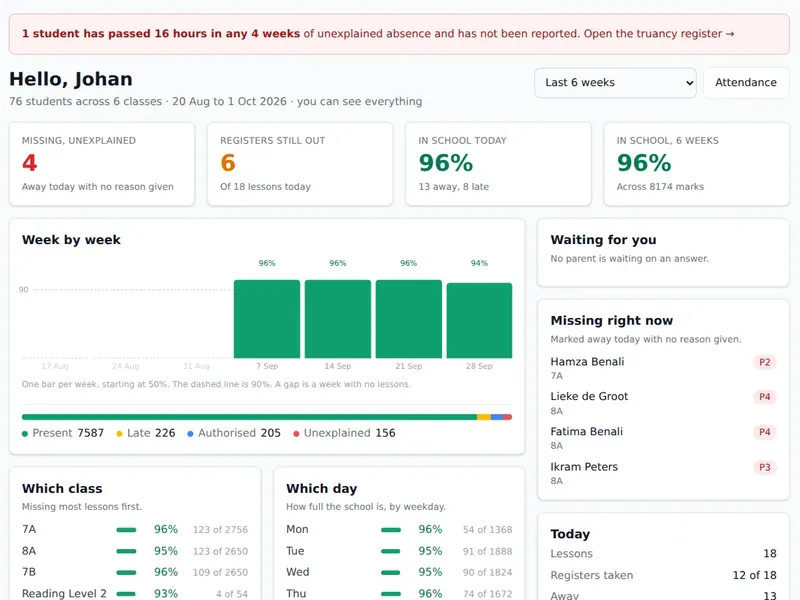
The head of school's dashboard in StudaHub with unexplained absences, registers still to take and a weekly attendance chart

StudaHub is school attendance software for the whole school. A teacher marks who is absent or late with one tap per child. Parents are emailed about an absence nobody has explained, and the office works through what is left. Every mark feeds the head's figures and a truancy register that counts against the limits your school sets.

Teachers

One tap per child, then save.

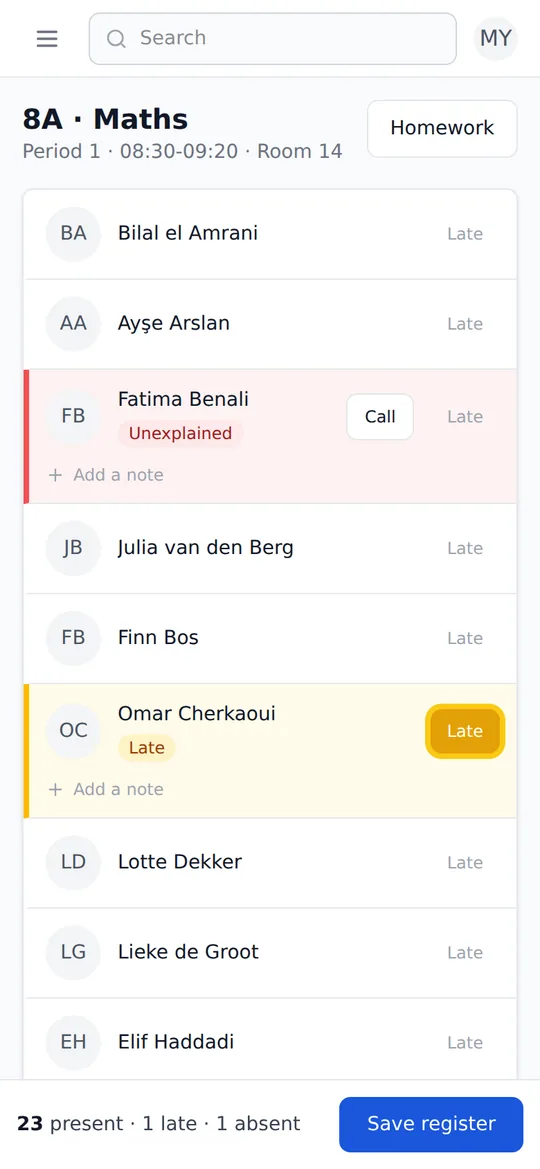
Everyone starts as present. The teacher taps the children who are not there and marks a late arrival with one more tap. The count at the bottom says how many are in, late and absent before the register is saved.

  • Works without signal, and sends when the connection is back
  • A note on any mark, such as a late reason
  • A call button next to a child who is missing
A teacher's register in StudaHub on a phone: one child marked absent and unexplained, one marked late, and the rest present

Parents and office

The absence is known before the bell.

A parent reports an absence from their phone. The teacher sees it in the register and the office confirms it with one click. When a child is missing and nobody has said why, the parents get an email within minutes.

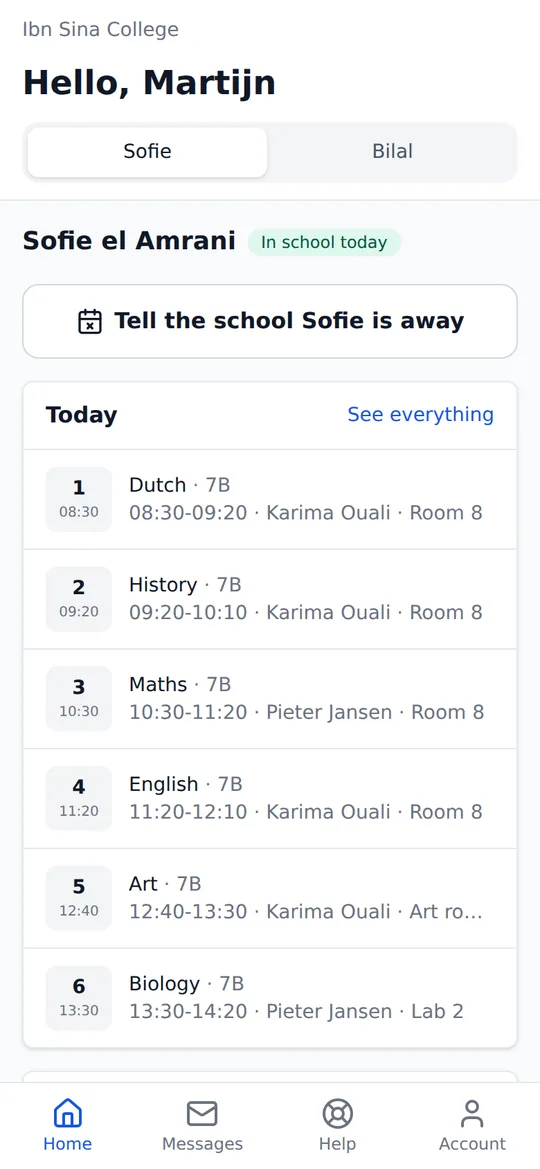
  • Absence reported by parents from their phone
  • An email to parents about an unexplained absence
  • The office confirms a reported absence with one click
A parent's home screen in StudaHub on a phone: a tab per child, a button to tell the school a child is away, and today's lessons

Truancy register

A truancy register that counts the way the rules do.

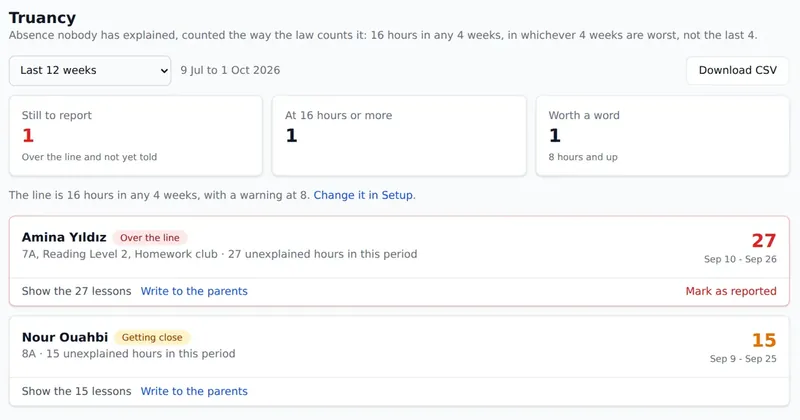
Unexplained absence is counted in lesson hours inside a window of weeks, in whichever weeks are worst, not only the last few. You set the line and the warning level, so the register follows the rules that apply to your school.

  • The line and a warning level, both set by the school
  • Children over the line who have not been reported yet
  • Mark as reported, write to the parents or download a CSV
The truancy register in StudaHub: children over the school's line for unexplained absence, with the hours and the weeks they fall in

Administration

The whole school's attendance by nine.

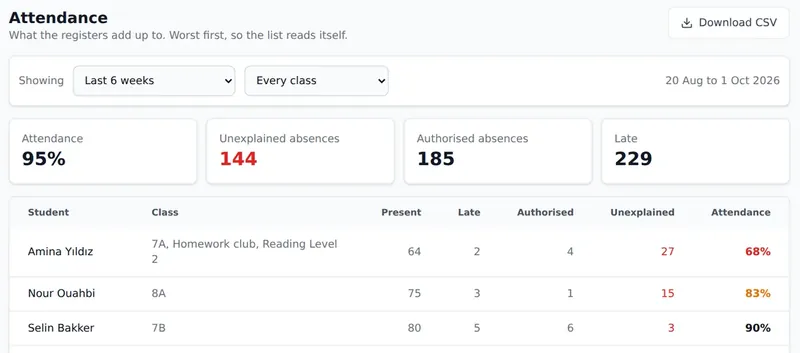
The head and the office see which registers are still out and which absences nobody has explained, without asking anyone. The same marks make the weekly figures.

  • Registers still to take, per lesson
  • Every student's attendance, worst first
  • Attendance export for your own reports
The attendance overview in StudaHub: attendance, unexplained and authorised absences and late arrivals, with every student listed worst first

What does a teacher see when they open the register?

Every lesson on the timetable has its own register, and a teacher's Today screen lists the lessons they teach with the registers still to take. Opening one shows the class with everyone marked present, so the teacher only touches the children who are not there.

There are four marks: present, late, absent with a reason, and absent without one. An absence a parent has already reported is shown in the register, so the teacher does not chase a child who is at the dentist. Saving records who took the register and when.

What happens to an absence nobody has explained?

When a child is marked absent and there is no reason, the parents are emailed within minutes. The office sees the same absence on its list that morning and can confirm a reason once a parent gets in touch, which turns it into an explained absence.

What is still unexplained is counted in lesson hours and fed into the truancy register. That register counts within a window of weeks you choose, in whichever weeks are worst, and lists the children over the line who have not been reported yet.

Is a changed mark recorded?

Yes. Every change to a mark is kept in the school's history: who made it, when, and what it was before. When a parent, an inspector or the local authority asks how a figure came about, the school can show each step instead of relying on memory.

Can parents see their child's attendance?

Parents see their child's attendance on their own home screen, next to the lessons and homework. They can tell the school about an absence before it starts, for one day or several, with a reason, and the teacher sees it in the register.

Paper registers and spreadsheets compared with StudaHub

TaskPaper or spreadsheetStudaHub
Taking the registerA list per lesson, collected and typed up laterOne tap per child on a phone or laptop, also without signal
Unexplained absenceThe office phones round mid-morningParents are emailed within minutes
A parent reports an absenceA phone call or a note that has to reach the teacherFrom their phone, and it shows in the register
Truancy hoursCounted by hand at the end of the monthCounted per lesson hour against the school's own limit
A corrected markCrossed out, with no trace of who or whyKept in the history with who changed it and when
ReportsFigures copied into a new documentAttendance and truancy download as a CSV

How it works

  1. Import your studentsUpload a spreadsheet (CSV) of students and guardians, in English, Dutch, French, German or Turkish column headings.
  2. Set up the timetableEach lesson in the timetable gets its own register, so teachers only see the classes they teach.
  3. Teachers take registersOn a phone or a laptop, in a few seconds, with or without signal.
  4. The office follows upUnexplained absence is listed the same morning, and parents are emailed automatically.

Frequently asked questions

Does the register work without internet?

Yes. A teacher can take the register without signal, for example in a sports hall. The marks are kept on the device and sent as soon as the connection is back, and a mark sent twice is not counted twice.

How are parents told about an absence?

When a child is marked absent and nobody has given a reason, the parents get an email within minutes. Parents can also report an absence themselves from their phone before school, and the teacher sees it in the register.

Can we set our own truancy limits?

Yes. The school sets the number of unexplained hours that has to be reported, a lower warning level, and the number of weeks they are counted over. It starts at 16 hours in any 4 weeks with a warning at 8, which is the rule in the Netherlands.

Can we export attendance?

Yes. Both the attendance overview and the truancy register download as a CSV file, to keep or to send on.