Attendance Tracking Software for Schools: What to Look For
Choosing attendance tracking software for schools? Check register speed, offline use, same-day follow-up, reports and data export before you sign anything.

Key takeaways
- Test the register on a real phone in a real classroom. If it takes more than a few seconds per class, teachers will find ways around it.
- The register is only half the job. Check how the office sees, follows up and records every unexplained absence.
- Ask about offline use, reporting thresholds, audit logs and data export before you look at extra features.
Good attendance tracking software for schools does four things well: teachers can take the register in seconds, the office sees every unexplained absence the moment registration closes, parents hear the same morning, and the records stand up when you need to report. If a system does those four reliably, most of the other features are a bonus. If it fails at any of them, no dashboard will make up for it.
This guide is for office managers, heads and administrators who are choosing a system for the first time or replacing one that staff have quietly stopped using. It sets out what to test, what to ask suppliers and what to ignore.
Start with the problem, not the feature list
Before you open a single demo, write down how attendance works in your school today. Who takes the register, on what, and by when? Who looks at the absences, and what do they do next? Where does the information go at the end of the week?
Most schools find the weak point is not the register itself. It is the gap between a teacher marking a child absent and someone in the office doing something about it. Paper registers collected at break, spreadsheets updated on Friday afternoons, emails to parents sent "when there's time": this is where children slip through. The best software closes that gap.
What should attendance tracking software for schools do?
1. Speed of taking the register
Teachers take a register every lesson or every morning, all year. Ten extra seconds per register adds up quickly, and a slow register is a register taken late or not at all.
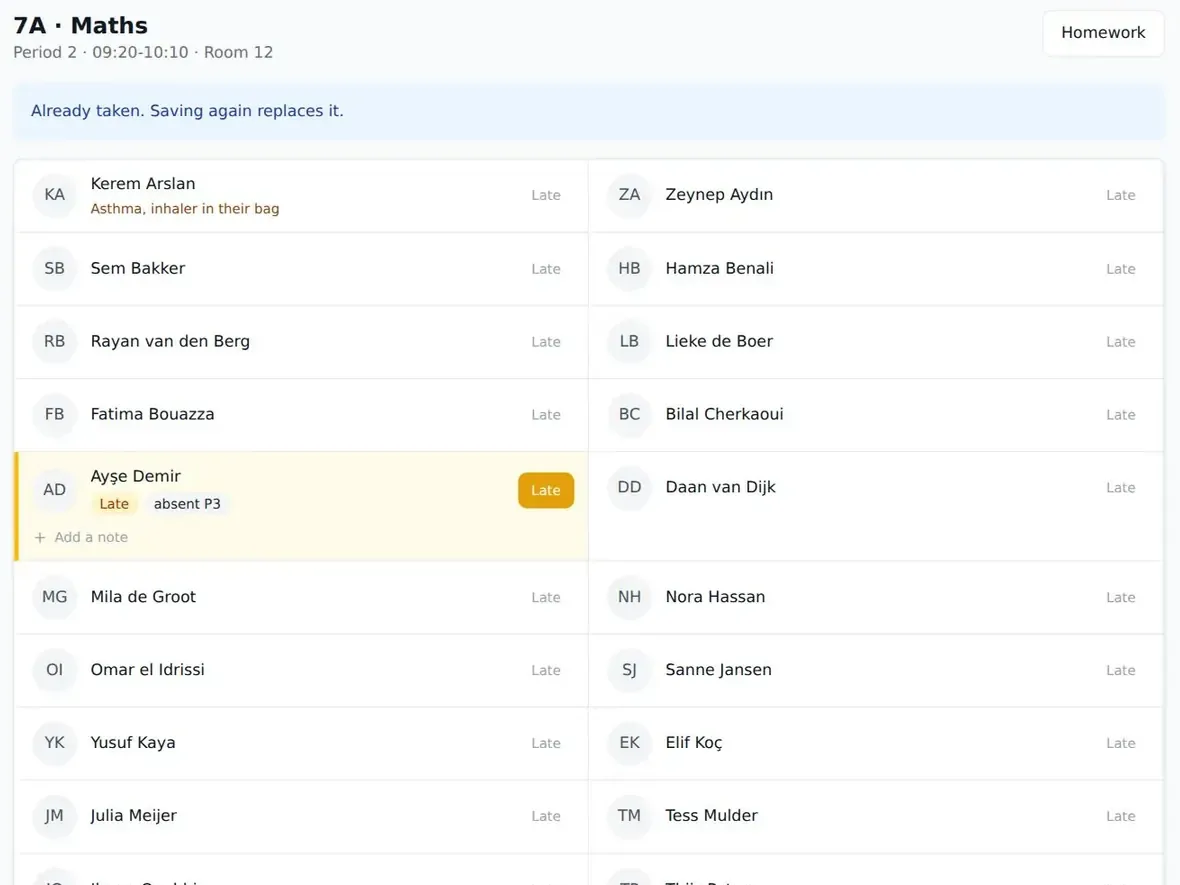
When you test, do it on an ordinary phone, not the supplier's laptop. Time how long a class of 30 takes. Check whether "everyone present" is the default, so the teacher only taps the exceptions. Check whether late marks are easy to add. As a reference point, StudaHub is built so a teacher can take a register on a phone in under twenty seconds.
2. Offline use
Ask this directly: "What happens if the teacher has no signal?" Many schools have a sports hall, a portable classroom or a rented hall where reception is poor. Weekend schools often use buildings they do not control at all.
If the answer is "the teacher will need to wait until they are back online", expect paper registers to creep back. What you want is a register that saves marks on the device and syncs by itself when the connection returns.
3. Follow-up, not just recording
This is where many systems fall short. Recording attendance is easy. Acting on it is the hard part. Check:
- Can the office see every unexplained absence across the whole school on one screen?
- Can parents be notified the same morning, without the office copying names into a separate tool?
- Can parents report an absence themselves, before school starts?
- Can the office mark each absence as authorised or unauthorised and add a note?
If the answer to any of these is no, you will end up running a second system (a spreadsheet, a phone list, a group chat) alongside the first. For the habits that make follow-up work, see how to improve school attendance.
4. Reporting that matches your rules
Your system should know your reporting line and gather what you need for it. Attendance Works uses 10% of school days missed as the marker for chronic absence. In the Netherlands, schools must report 16 hours of unauthorised absence within 4 consecutive school weeks to the leerplichtambtenaar through DUO.
Ask suppliers how their software handles your threshold. Can you set the line yourself? Does it collect the absences that cross it in one place, ready for reporting? StudaHub, for instance, keeps a truancy register of unexplained absence past the line the school sets.
5. Trustworthy records
Attendance records can end up in difficult meetings with parents or in formal referrals. You need to know that nobody quietly changed a mark after the fact, or that if they did, it shows. Look for:
- An audit trail that logs who changed what, and when.
- Permissions by role, so a teacher cannot edit another class's register unless you allow it.
- Full data export in open formats, so the records are yours if you ever change supplier.
A comparison table for your shortlist
Use this during demos. Score each system from 0 (missing) to 2 (does it well).
| What to check | Why it matters | System A | System B | System C |
|---|---|---|---|---|
| Register on a phone in under a minute | Teachers will actually use it | |||
| Works without signal and syncs later | No paper registers in the sports hall | |||
| One list of all unexplained absences | Office can start calls straight away | |||
| Same-day messages to parents | Families know before mid-morning | |||
| Parents can report absence themselves | Less chasing for the office | |||
| Authorised and unauthorised marking | Clean data for reports | |||
| Configurable reporting threshold | Matches your legal or local rules | |||
| Audit trail of changes | Records you can defend | |||
| Full data export in open formats | You keep your data | |||
| Price that does not grow per student | Predictable budget |
Questions to ask every supplier
Demos are designed to show the best parts. These questions bring out the rest.
- "Can I try it with our own classes and a real phone, not demo data?"
- "How do we import our students and families? What format do you need?"
- "Where is our data hosted, and can you give us a data processing agreement?"
- "If we leave, how do we get all our data out, and in what format?"
- "What does it cost per year for our current roll, and for 50% more students?"
- "What is included in that price? Parent access? All staff logins?"
- "How long does a typical school take to go live?"
The data questions are not a formality. Under GDPR, a supplier handling student data on your behalf is a processor, and Article 28 requires a written contract with them. Article 20 covers data portability. Our guide to GDPR for schools goes through what to check in more detail.
What can you safely ignore at first?
Suppliers love to show colourful charts and long feature lists. Some of that is useful, but none of it matters if the basics are slow. Be wary of choosing a system because it does fifty things when you need five done well. You can always add more later. You cannot easily win back teachers who have decided the register is a nuisance.
Also think about everyone who will use it, not just the office. Parents should not need to install anything or remember yet another password system. Teachers need a view that shows only their classes. The head needs the whole-school picture. Different people need different views.
A copyable checklist for testing
Run through this while you test a system, ideally with two or three teachers involved.
- Import real student and guardian data from your current spreadsheet.
- Have three teachers take real registers on their own phones for a week.
- Take one register with the phone in flight mode, then reconnect and check it synced.
- Check the office absence list within five minutes of registration closing.
- Send a same-day absence message to a test parent account.
- Report an absence as a parent, from a phone, before school.
- Mark absences as authorised and unauthorised and add notes.
- Set your reporting threshold and check which students appear.
- Change a mark and confirm it shows in the audit trail.
- Export all data and open the file to check it is complete.
- Get the full yearly price in writing, including any extras.
- Ask the teachers: would you keep using this?
Choosing attendance tracking software for schools with confidence
The right attendance tracking software for schools is the one your teachers use every lesson without complaint and your office can act on before mid-morning. Test it in real rooms with real phones, ask the hard questions about data and price, and pay attention to how follow-up works, not just how the register looks.
If you want to put StudaHub through this checklist, the first 3 months are half price, and the pricing is a flat price per school.
To see how this looks in practice, read how StudaHub's school attendance software handles registers, absence emails and the truancy register.
Frequently asked questions
What should attendance tracking software for schools do?
At minimum it should let teachers take a register quickly on any device, show the office every unexplained absence in one place, notify parents the same day, and record authorised and unauthorised absence. Good systems also keep a change log, produce reports for your attendance officer and let you export all your data.
Does attendance software need to work offline?
If any of your lessons happen in places with poor signal, such as a sports hall, a basement room or a rented community building, yes. A register that fails without a connection gets taken on paper instead, and then someone has to type it in later. Look for software that saves marks on the device and syncs when signal returns.
How much does attendance tracking software cost?
Pricing varies widely. Some suppliers charge per student, which grows with your roll, while others charge a flat price per school. Ask for the total yearly cost for your current number of students and for a larger roll, and check whether parent access, extra staff logins or data export cost extra.
Who in a school uses attendance tracking software?
Teachers take the register, the office follows up unexplained absences and contacts parents, and the head watches patterns across the school. Parents use it too: they report an absence before school and see their child's attendance. Good software gives each of these people their own view rather than one shared screen.
How quickly can a school start tracking attendance in new software?
If your students, classes and timetable are ready in a spreadsheet, setting up takes days rather than weeks. The slow part is usually tidying the data and showing teachers the register. Start at the beginning of a week, and ideally at the start of a term, so every mark is in one place.