School management softwareYour whole school, on one record

StudaHub is school management software for the whole school. Administration, office staff, teachers, parents and students work from one record: attendance, timetables, homework and messages are entered once and visible to everyone who should see them.

Day schoolsRegisters, timetables and reports for every class.

Weekend and evening schoolsWeekend timetables, volunteer teachers and progress per child.

GDPR-compliant · Hosted in the EU · First 3 months half price

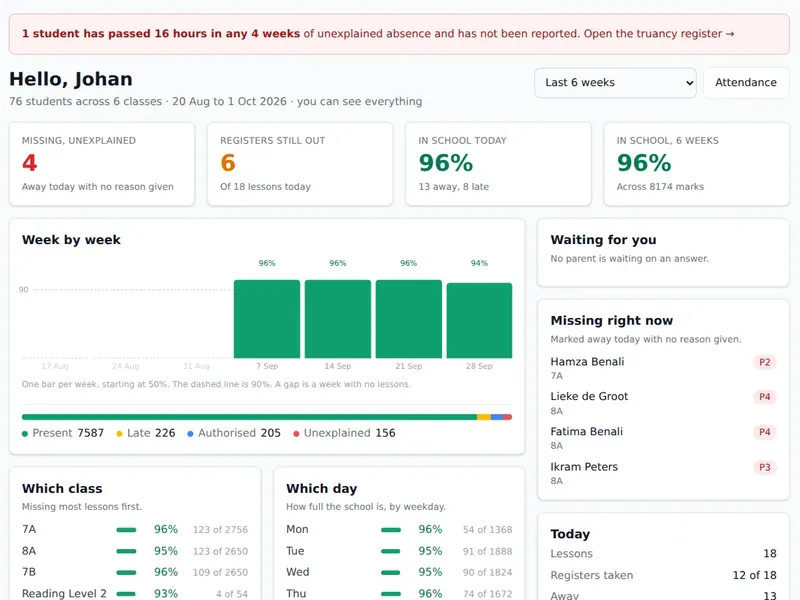
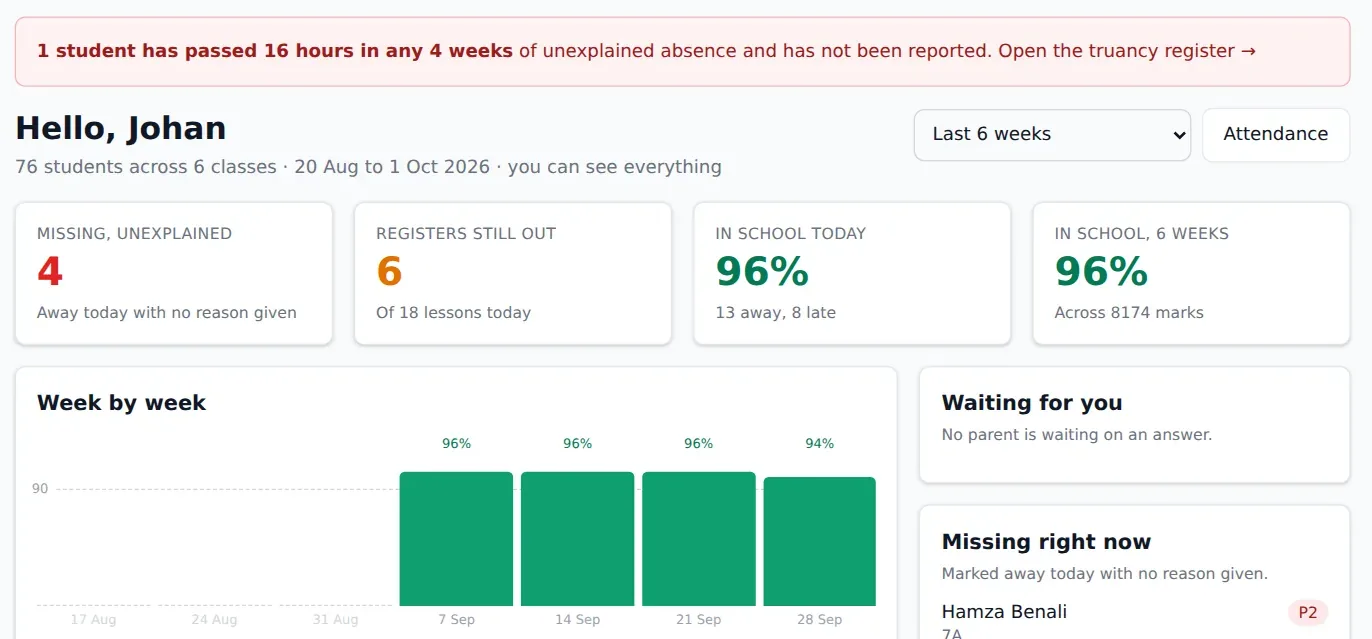
StudaHub admin dashboard: today's attendance, registers still out, week-by-week attendance chart, and attendance by class and weekday
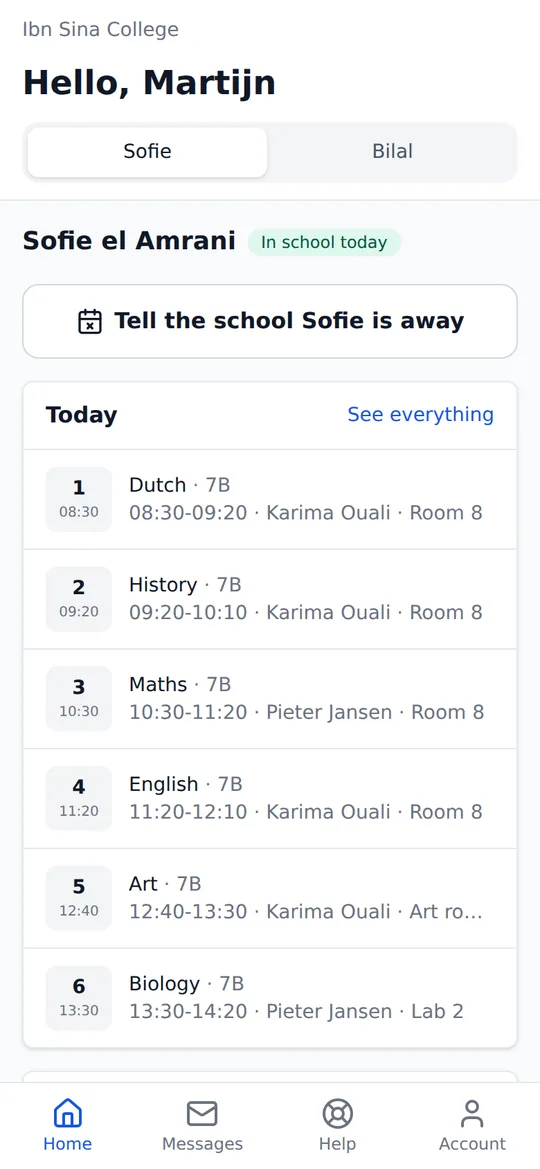
A parent's home screen in StudaHub on a phone: today's lessons for their child and a button to report an absence

Register taken8A Maths · 08:31 · 23 present

Absence reportedBy a parent, before the first lesson

How it works

One record. Everyone sees only their part.

Something is entered once and reaches everyone who needs it, each in their own screen. Here is one absence, from the parent's phone to the head's figures.

07:52 · Parent Reports that Sofie is ill From the parent's phone, in two taps.
One record Sofie el Amrani · 7B Absent today: ill, reported by a parent at 07:52.
  • TeachersSee it before they take the 08:30 register.
  • OfficeConfirm it with one click. No phone call.
  • AdministrationSee it in today's attendance figures.
  • AdministrationThe whole school
  • OfficeAbsences, enrolment and parents
  • TeachersTheir own lessons and classes
  • ParentsOnly their own children
  • StudentsTheir own timetable and homework

The right screen for each person

Built for the school day, not the sales demo

Organised the way a school runs: the morning register, the timetable grid, the homework board, the report at term's end.

Teachers

The register is done before the lesson starts.

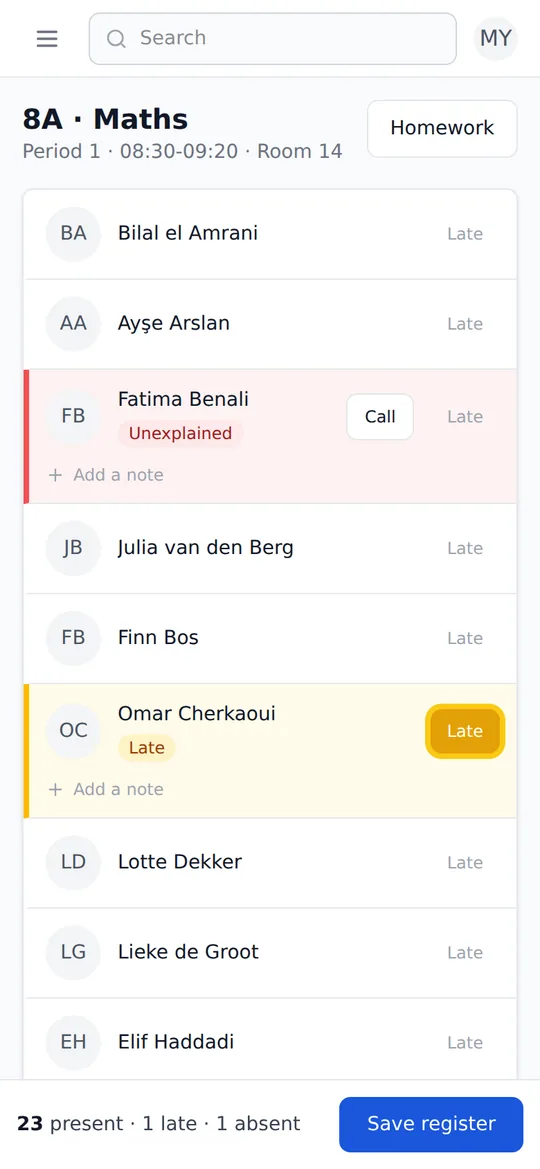
Everyone starts as present. The teacher taps the children who are not there, and one more tap marks a late arrival.

  • One tap for absent, one for late
  • Keeps working without signal, and sends when it is back
  • A call button next to a child who is missing
More about attendance →
A teacher's register in StudaHub on a phone: one child marked absent and unexplained, one marked late, and the rest present

Parents

Parents see what the teacher recorded.

No separate parent app to keep up to date. The lessons, homework and absences a parent sees are the ones the school entered.

  • Report an absence from their phone
  • Today's lessons and this week's homework
  • Messages from the school, also by email
More about homework →
A parent's home screen in StudaHub on a phone: today's lessons for their child and a button to report an absence

Administration and office

The whole school, at a glance, by nine.

The head and the office see what needs doing today, without asking anyone: which registers are still out and which absences nobody has explained.

  • Registers still to take, per lesson
  • Unexplained absences to follow up
  • Attendance by class, by weekday and by week
The head of school's dashboard in StudaHub with unexplained absences, registers still to take and a weekly attendance chart

For your kind of school

Five days a week or two hours on a Saturday.

Day schools, weekend schools and tutoring centres all run on the same student records. When you sign up you say what kind you are, and the timetable starts from the right days.

For day schools

Primary and secondary schools with a full week, several classes per year and staff who cover for each other.

  • A weekly timetable that becomes real, dated lessons
  • A truancy register that flags when absence needs reporting
  • Grades and learning tracks per subject
What a school system should do

For weekend and evening schools

Supplementary schools that run on volunteers and a few hours a week, and need things to be simple on a busy morning.

  • A timetable on Saturday and Sunday
  • A login for every volunteer, with only what they need
  • Each child's progress, step by step
Software for weekend schools

For tutoring centres and extra lessons

Tutoring centres, homework clubs and schools that run extra lessons, in small groups or one to one, after school or at the weekend.

  • Sessions at the times you teach
  • A login per tutor, with only their groups
  • Parents who see sessions, homework and progress
Software for tutoring centres

Flat pricing, per school

No per-student surprises. Every plan includes all five roles.

Introductory offer: the first 3 months at half price. Paying yearly? Then the first year is 15% off.

Small

Up to 15 students

€9,50 /mo

First 3 months, then €19 /mo

  • Offline registers
  • Absence alerts
  • Truancy register
  • Timetable
  • Homework
  • Learning tracks
  • Memorisation
  • Grades
  • Messages
  • Import & export
  • All 5 roles
  • Emails to parents and staff
Start with Small

Large

100 to 200 students

€39,50 /mo

First 3 months, then €79 /mo

  • Offline registers
  • Absence alerts
  • Truancy register
  • Timetable
  • Homework
  • Learning tracks
  • Memorisation
  • Grades
  • Messages
  • Import & export
  • All 5 roles
  • Emails to parents and staff
Start with Large

More than 200 students? We agree a price that fits your school. Get in touch

Every plan includes every feature. The only difference is the number of students.

Pricing in detail, with VAT and payment →

The five roles in every plan

  • Administration Sets up the school, classes, staff and reports.
  • Office Handles enrolment, absences and contact with parents.
  • Teachers Take registers, set homework and give grades.
  • Parents See their child’s absences, homework and messages.
  • Students See their own timetable, homework and progress.

Questions, answered

Where is our data stored, and who owns it?

Your school owns its data, full stop. StudaHub is hosted in the EU, GDPR-compliant, and exports everything (students, guardians, attendance) in open formats whenever you ask, including when you leave.

Can we import from our current system?

Yes. On every plan you can import students and guardians from a spreadsheet (CSV). Column headings in English, Dutch, French, German or Turkish, such as Last name, Achternaam, Nom, Nachname or Soyadı, are matched automatically, and you can match any other column by hand before anything is saved.

What do parents and students need to install?

Nothing. StudaHub runs in the browser on any phone or computer; parents and students sign in with an invitation the school sends. Notifications work by email or, optionally, push.

Who decides what each role can see?

Permissions are set by role (admin, office, teacher, parent, student) with sensible defaults out of the box. Administrators can tighten or extend them per role, and every change is logged.

How long does onboarding take?

You can start the same day. A new school answers five short questions (the school day, subjects, the first class, the children and the staff) and is ready for its first register. Every step can be skipped and finished later, and a real person answers your emails.
See your school in it

A demo takes thirty minutes and uses a sample school shaped like yours. Bring the office manager and one sceptical teacher. They're who we build for.

Prefer email? info@studahub.com

Get started with StudaHub

The first 3 months are half price. We email you a link, you choose a password, and then you pay with iDEAL, SEPA direct debit or card.