What Is a School Management System? A Practical Guide
What a school management system is, what it covers, who uses it and how to choose one, written from the school office side. Includes a copyable checklist.

Key takeaways
- A school management system is one shared place for attendance, timetables, homework, messages and student records, with a separate view for each role.
- The test of a good system is the busy Monday morning: can teachers take the register in seconds and can the office see every missing child at once?
- Before you choose, check pricing, data export, hosting and how long go-live takes, not just the feature list.
A school management system is web software that holds the day-to-day running of a school in one place: attendance registers, absence follow-up, the timetable, homework, messages to parents and the student records underneath all of it. Each person who uses it (the head, the office, teachers, parents and students) signs in and sees the part that belongs to them.
This guide is for heads of school, office managers and the people who run weekend schools, supplementary schools and after-school clubs. If you are still juggling a paper register, three spreadsheets and a parents' group chat, it will help you work out what a school management system would actually change, what it should cover, and how to pick one without regret.
What does a school management system do?
Strip away the brochure language and a school management system does three jobs. It records what happened (who was in, who was not, what was taught and set). It tells the right people quickly (the office, the parents, the attendance officer). And it keeps a trustworthy history, so that in March you can still answer a question about October.
Everything else is detail. But the detail matters: the difference between a system staff love and one they quietly work around is often thirty seconds on a Monday morning.
The core modules
Most school management software is built from the same modules, under varying names. Here is what each one is for.
| Module | What it does | Who relies on it most |
|---|---|---|
| Attendance register | Teachers mark present, absent or late for each lesson or session | Teachers, office |
| Absence follow-up | Collects unexplained absences, contacts parents, records reasons | Office, parents |
| Timetable and calendar | Periods, subjects, rooms, teachers, holidays and closures | Office, teachers, students |
| Homework | Tasks set for a class or a student, with due dates | Teachers, parents, students |
| Progress tracking | Records where each child is in a sequence, such as reading levels | Teachers, head |
| Messages | Letters and notices to parents of a class or the whole school | Office, head |
| Student and guardian records | Names, contacts, classes, who may collect whom | Office |
| Permissions and audit trail | Who can see and change what, and a log of every change | Head, office |
The student and guardian records are the part often sold on its own as a student information system; our guide on what a student information system is covers it in depth. You do not need every module on day one. You do need the register and absence follow-up to be excellent, because those are the parts used every single day.
Who uses a school management system?
A school is not one kind of user. The quickest way to judge a school management system is to picture each role on an ordinary morning.
- The head of school wants the overview: attendance patterns, who is falling behind, whether the office is coping. They also set permissions and need to know every change is logged.
- The office needs one list of every unexplained absence across the school, not a phone call to each classroom. They write to parents and keep records up to date.
- Teachers need to take the register fast, on whatever device is in their hand, and set homework without a separate login somewhere else.
- Parents want to know the same morning if their child is missing, see homework and report an absence without ringing the office at 8:15.
- Students want to see their timetable and what is due.
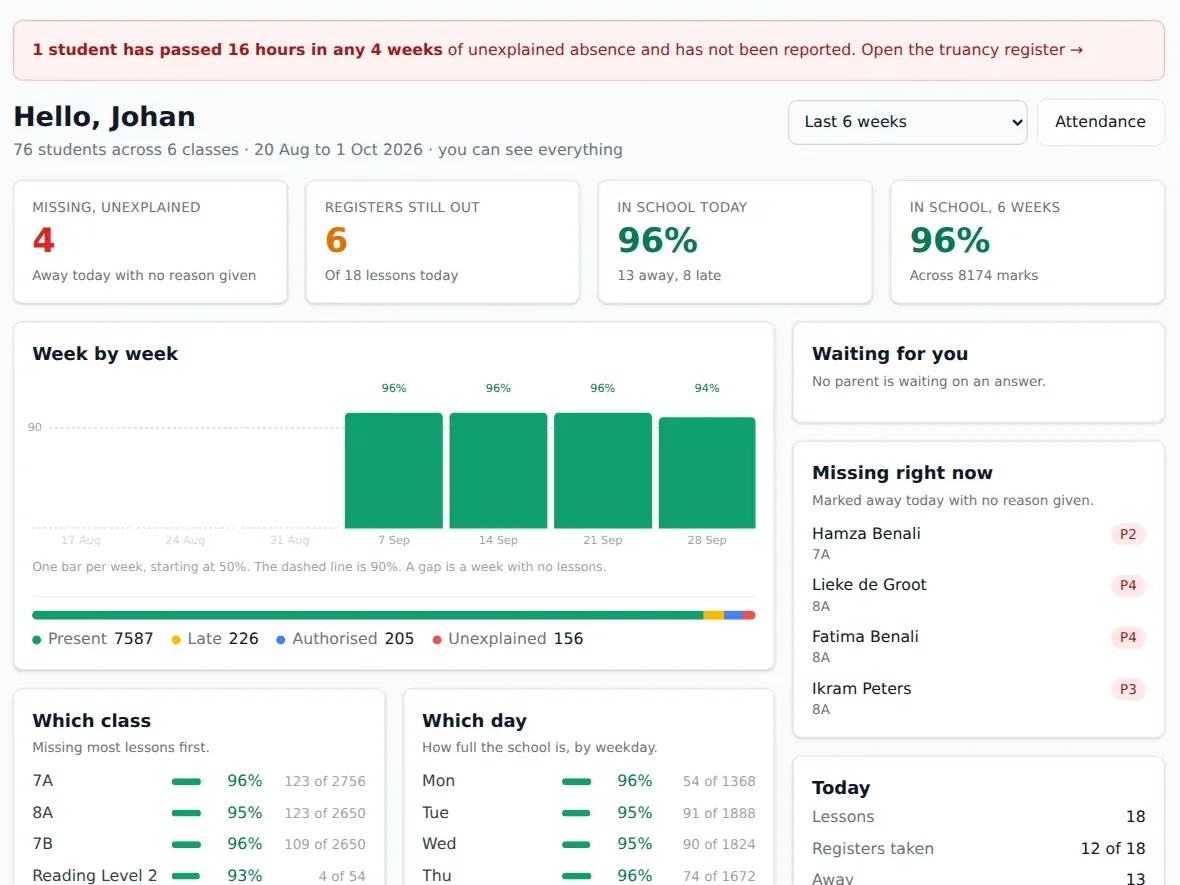
A good system gives each of these people their own view rather than one crowded screen with bits hidden. In StudaHub, for example, each of the five roles has its own login and view, and permissions come with sensible defaults you can adjust once.
Why schools move to one system
Schools rarely buy a school management system because they want software. They buy it because something went wrong: a child was missing all morning and nobody told the parents until lunchtime.
Attendance is the everyday reason
Attendance is where scattered tools hurt most. Attendance Works defines chronic absence as missing 10% or more of school days for any reason, excused or not. That is about two days a month. Two days a month does not look alarming on a single paper register. It only becomes visible when all the marks sit in one place and someone can see the pattern building.
In the Netherlands the stakes are formal: schools must report 16 hours of unauthorised absence within 4 consecutive school weeks to the leerplichtambtenaar through DUO's absence register. In England, the Department for Education's statutory guidance Working together to improve school attendance sets out what schools are expected to do. Either way, you need reliable records and a quick way to spot who has crossed the line. Our guide on how to improve school attendance goes into the day-to-day side.
Communication is the second reason
The other common trigger is parent communication. Letters in book bags go missing. Group chats blur the line between official notices and chatter. A school management system gives you one channel for absences, homework and whole-school messages, with a clear record of what was sent and when.
What to look for when choosing school management software
Feature lists all look alike after the third demo. These questions separate the options.
Speed and reliability on the ground
Ask a teacher to take a real register on a phone while you test it. If it takes more than a few taps per class, it will not get done on time. Check what happens with no signal: sports halls, basements and church halls rented by weekend schools often have none. A register that saves on the device and syncs later is worth a lot. The guide to attendance tracking software for schools covers this in more depth.
How changes are handled
Timetables change constantly. Ask how the system handles a one-off change. The right answer is that you change one lesson and the weekly pattern stays as it is. Also ask how a new school year is started, and whether a mistake can be undone.
Parents and students
If parents have to download and install something, a share of them never will. Browser-based access through an invitation the school sends tends to reach far more families. Check that parents can report an absence themselves, and that they are told the same morning when their child is missing.
Data, privacy and leaving
Student data is personal data, and under the GDPR your supplier is a processor. Article 28 requires a written data processing agreement with them. Article 20 covers data portability. In practice, ask three things: where is the data hosted, can we export everything in open formats, and can we do that when we leave? A supplier that is vague about leaving is telling you something.
Pricing you can predict
Some school management systems charge per student, some a flat price per school, and some add fees for extra roles or modules. Work out what you would pay next year if you grew by a class. We have written a separate guide to school management software pricing with a way to compare quotes fairly.
School management systems for weekend schools and clubs
Supplementary schools, Saturday schools and after-school clubs have the same needs in a smaller, faster package. You might meet for three hours a week, with volunteer teachers who change each term and a hall you rent by the session. What matters most is a register anyone can take without training, a way to reach parents quickly and a record of each child's progress through a sequence, such as reading levels or a text learned by heart.
Avoid anything priced or designed for a large secondary school. You want flat, low pricing and no software to install on borrowed devices.
A checklist you can copy
Use this when you sit through a demo or run a test. Tick only what you have seen working, not what the salesperson promised.
- A teacher can take a full class register on a phone in well under a minute
- The register still works with no signal and syncs later
- The office sees every unexplained absence across the school on one screen
- Parents are messaged the same morning when their child is missing
- Parents can report an absence themselves
- Absences can be marked authorised or unauthorised
- Absence past our threshold is collected for the attendance officer
- A one-off timetable change does not break the weekly pattern
- Holidays and closures are part of the calendar
- Homework is visible to parents and students with due dates
- Each role has its own view and permissions
- Every change to records and permissions is logged
- Students and guardians can be imported from our existing spreadsheet
- Parents and students need nothing installed
- Data is hosted in the EU (or where we need it) and a data processing agreement is offered
- We can export everything in open formats, including when we leave
- We know the price for next year if we grow
- Go-live fits between terms, with time for staff training
Where to start
Before you look at any product, write down the three things that go wrong most often in your office. For most schools it is the Monday register, chasing absences and getting a message to every parent. Judge every school management system against those three, in a real test with real staff, and the right choice usually becomes obvious.
If you are moving from an existing tool, read our plan for switching school management software before you set a date. And if you want to see how StudaHub handles your three problems, the first 3 months are half price, and the pricing is a flat price per school.
To see each part in StudaHub, read about attendance, the timetable, homework and pricing.
Frequently asked questions
What is the difference between a school management system and a learning platform?
A school management system runs the organisation: registers, absences, timetables, records and messages to families. A learning platform is where lessons, resources and assignments are delivered. Some products overlap, but when you compare them, ask which problem you need solved first. For most school offices, that is attendance and communication.
Does a small weekend school need a school management system?
Not always, but it usually helps once you have more than a handful of classes or volunteers who change often. Even a small school has to know who was present, reach parents quickly and keep records safe. A simple, flat-priced system can replace the folder, the spreadsheet and the group chat at once.
How long does it take to set up a school management system?
It depends on the product and on how tidy your data is. A realistic plan is about two weeks: one week to set up classes and import students and guardians from a spreadsheet, and one week to train staff. Starting between terms is easier than starting in the first week of a new year.
How much does a school management system cost?
Prices vary widely, depending on how the supplier charges. Per-student pricing grows with every enrolment, flat pricing per school does not. StudaHub, for example, costs 19 euros a month for up to 15 students and 49 euros for 16 to 99. Compare the total over three years, not the first month.
Who uses a school management system?
The head of school, the office, teachers, parents and students, each in their own way. The office and head see the whole school, teachers see their own classes, parents see their own children and students see their own timetable and homework. A good system gives each role its own view.