What Is a Student Information System? A Plain Guide
What a student information system (SIS) is, what a student record should hold, how an SIS differs from a school management system, and a checklist to compare.

Key takeaways
- A student information system holds the record of every student: details, guardians, classes, attendance and results. Everything else a school does reads from it.
- The best test is not the feature list but the record itself: can the office keep it right, and does each person see only the part that is theirs?
- Ask how data gets in, how it gets out and who changed what. Import, export and a change history matter more than any dashboard.
A student information system (SIS) is software that holds the record of every student in a school: their name and details, their guardians and how to reach them, the classes and groups they are in, and what has happened to them over time, such as attendance, homework and results. Staff, parents and students each see the part of that record that belongs to them.
This guide is for heads of school, office managers and the people who run weekend schools, supplementary schools and tutoring centres. If your student records live in two spreadsheets, a paper folder and somebody's memory, it will help you work out what a student information system should hold, how it differs from a school management system and what to check before you choose one.
What does a student information system do?
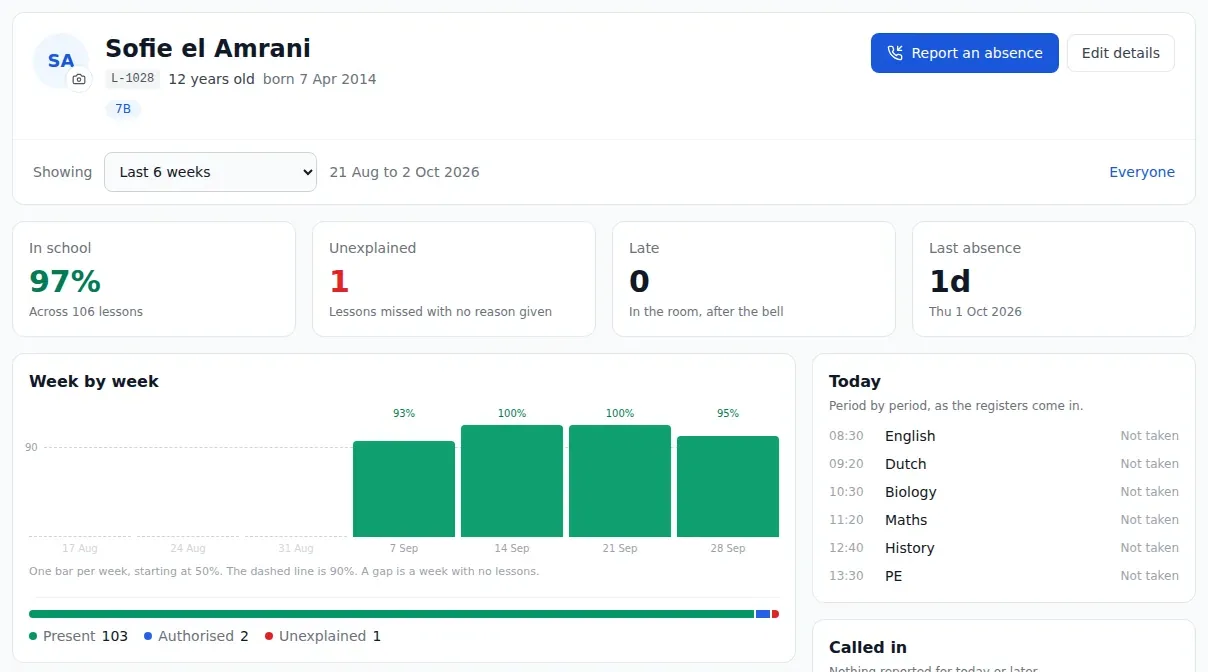
A student information system does three jobs. It keeps one trustworthy record per student. It shows that record to the right people and hides it from everyone else. And it keeps the record over time, so that in June you can still answer a question about something that happened in October.
Put simply, it is the answer to "where do we keep the children's details?" that does not end with "it depends who you ask".
What a student record should hold
Different schools need different fields, but most student records come down to the same parts.
| Part of the record | What it holds | Who needs it most |
|---|---|---|
| Student details | Name, preferred name, date of birth, student number, photo | Office, teachers |
| Guardians | Who they are, how to reach them, who is the first contact | Office, head |
| Collection and contact | Who may collect the child, who gets messages | Office, teachers |
| Medical notes | Allergies, conditions, what to do in an emergency | Teachers, office |
| Classes and groups | Which classes, sets and clubs the student is in | Teachers, office |
| Attendance | Present, late and absent marks, with reasons | Office, teachers, parents |
| Homework and results | What was set, whether it was done, grades | Teachers, parents |
| History | Who changed what, and when | Head, office |
Two of these are worth a closer look. Guardians are where spreadsheets go wrong first: a family with three children becomes three copies of the same phone number, and when the number changes, only one copy gets updated. And medical notes only help if the person standing in front of the class can see them, not just the office.
Student information system or school management system?
The two terms are often used as if they mean the same thing. They overlap, but they are not identical.
- A student information system is the record: who the students are and what has happened to them.
- A school management system runs the school day around that record: registers, the timetable, homework, absence follow-up and messages to parents.
Many schools end up with both, bought at different times from different suppliers, and then keep them in step by hand. The register lives in one place, the guardians in another, and every new student has to be typed in twice. That is where errors creep in.
The simpler setup is one system that does both. When a teacher marks a child absent, the mark goes straight onto the child's record, and the guardian on that same record gets the message. In StudaHub, for example, the student record and the daily running of the school are the same thing, so there is no second list to update. Our guide on what a school management system is covers the day-to-day side in more detail.
Who sees what
A student record holds some of the most sensitive information a school has. The question is not only whether it is stored safely, but whether each person sees only what they need.
A sensible default looks like this:
- The head and the office see every student, because they are responsible for all of them.
- A teacher sees the students in the classes they teach, including the medical notes that matter in a lesson.
- A parent sees only their own children.
- A student sees only their own record.
This is not only good practice. Under the GDPR, Article 5 sets out the principle of data minimisation: personal data should be limited to what is necessary for the purpose. A system that shows every teacher every child's medical notes fails that test, however convenient it feels. The UK Information Commissioner's Office has practical resources for schools on handling children's information, and our GDPR guide for schools goes through what to check in any software.
What to look for in a student information system
Every demo shows a tidy list of students. These questions show what it is like to keep that list right for a whole year.
How does data get in?
Nobody wants to type 300 students in by hand. Ask whether the system imports a spreadsheet (CSV) of students and guardians, whether it recognises your column headings or makes you rename them, and whether it shows you what it found before anything is saved. Then ask how brothers and sisters are linked to the same guardian, because that is where most imports go wrong.
How does data get out?
You should be able to download your students, with their classes and guardians, as a spreadsheet whenever you like. That matters for reports, for the local authority and for the day you leave. The GDPR's Article 20 gives individuals a right to data portability, and a supplier who makes export difficult is telling you something.
Is every change recorded?
When a guardian's phone number changes, or a mark in the register is corrected, the system should keep who made the change, when, and what it was before. A history like that settles arguments and answers an inspector's questions without guesswork.
What happens at the end of the year?
The school year ends, classes move up, some students leave and new ones arrive. Ask how the system handles that. A good student information system shows you what the new year will look like, class by class, before it changes anything, and keeps last year's records as they were.
Who processes the data, and under what contract?
If the system is hosted by a supplier, that supplier is processing personal data on the school's behalf. Article 28 of the GDPR requires a written contract for that, usually called a data processing agreement. Ask for it before any real student data goes in, not after.
A checklist you can copy
Use this during a demo or a test run. Tick only what you have seen working.
- Each student has one record with details, photo and medical notes
- Guardians are linked to children, not copied per child
- We can record who may collect a child and who gets messages
- Teachers see medical notes for the classes they teach
- Parents see only their own children, students only themselves
- A student can be in several classes and groups at once
- Attendance, homework and grades sit on the same record
- We can import students and guardians from our spreadsheet
- We can export students with classes and guardians at any time
- Every change to a record is kept, with who and when
- The year rollover shows a preview before anything changes
- The supplier offers a data processing agreement
- We know where the data is hosted
Where to start
Before you compare any student information system, open your current records and pick five students at random. For each one, check that you know who may collect them, how to reach their first contact and what a teacher should know in an emergency. If any of those took more than a minute to find, that is the problem your new system has to solve.
Then judge every option by how well it keeps that record right, and how well it shows each person only their part. To see how StudaHub does it, read about our student information system. You can import your own spreadsheet to get started. The first 3 months are half price, and the pricing is a flat price per school.
Frequently asked questions
What is the difference between a student information system and a school management system?
A student information system is the record: who your students are, who their guardians are, which classes they are in and what has happened to them. A school management system runs the day around that record, with registers, timetables, homework and messages. Many products do both, and it is simpler when they are one system.
Does a small school or weekend school need a student information system?
It needs the record, whatever it is called. Even a school of 40 children must know who may collect each child, who to ring in an emergency and which medical notes a teacher should see. A spreadsheet can hold that, but it cannot show each teacher only their own classes or keep a history of changes.
Can we move our records from our current system?
Usually, yes. Most systems can export students and guardians as a spreadsheet (CSV), and most student information systems can import one. Check the export opens and makes sense before you cancel anything, and expect to tidy up duplicates and missing guardians during the move.
Who uses a student information system?
Mostly the office, which keeps the records right, and the head, who needs the overview. Teachers use the parts that matter in class, such as medical notes and contact details for their own students. Parents and students see only their own record, for example attendance and homework.
How much does a student information system cost?
Some suppliers sell a student information system on its own and charge per student, others include it in a school management system with a flat price per school. StudaHub includes the student records in every plan, from 19 euros a month for up to 15 students. Ask any supplier what export and extra users cost: with StudaHub both are in every plan.